
Reviews
What Is Data Recovery? How It Works and What to Expect


Data loss can interrupt work, remove access to important files, or affect entire devices. Data recovery provides a way to bring that information back through clear and structured steps. To help you understand the process, we will explain what data recovery is, how it works on different types of devices, when software tools are enough, and when professional services are required. You will also see what to expect in terms of cost and limitations, so you can choose the safest recovery path.
What Is Data Recovery?
Data recovery is the process of restoring files that were lost, deleted, damaged, or made inaccessible on a computer, phone, or any other storage device. Even when data disappears from view, the information often still exists on the drive for a short time. The system simply stops showing it and marks that space as free, which creates an opportunity for recovery before new data overwrites it.
The goal of data recovery is simple: find whatever traces of your files still exist and pull them out to a safe location. Each situation needs a different type of recovery. Some issues need simple tools, but others may need advanced equipment and trained engineers. This section explains the main types and the methods that support them.
Logical Data Recovery
Logical recovery focuses on situations where the device still works, but the system cannot access the files. This type of data and system recovery deals with deletion, formatting, corruption, and malware damage. When someone deletes a file, the system removes its reference in the file table. The actual data remains on the drive until new information replaces it. The data recovery tool takes advantage of this window. It scans the device for leftover data structures and file signatures.
Logical tools rely on several methods:
– file system repair for NTFS, FAT32, APFS, ext4
– signature-based carving that relies on patterns such as FFD8 for JPEG
– metadata reconstruction for names, folders, and timestamps
– partition repair for lost or damaged volumes
– deleted file scanning through quick and deep analysis
Logical recovery works well for most everyday cases and often succeeds without professional help.
Physical Data Recovery
Physical recovery takes place when the hardware fails. Drives may stop working because of mechanical damage, electrical faults, firmware errors, or shocks caused by drops or water exposure. A hard drive may develop head crashes or motor failures. An SSD may stop responding because of a faulty controller or damaged NAND cells. In these situations the device needs specialized attention.
Methods used in physical recovery include:
- cleanroom disassembly that protects platters from dust
- read/write head replacement using donor parts
- PCB repair and micro-soldering for damaged electronics
- firmware module access and correction
- platter-level imaging with specialized equipment
This approach requires advanced tools and experience. It offers the highest success rate when the hardware itself cannot function normally.
What Happens During Data Retrieval?
The exact method depends on the type of failure. When the device still works and the issue remains at the logical level, recovery software takes the lead. When hardware damage prevents the device from functioning normally, professional services and cleanroom techniques become necessary.
How Data Recovery Software Works
Data recovery software restores files when the device still functions and the issue remains at the logical level. These are the most common scenarios people face, such as accidental deletion, formatting mistakes, or mild file system corruption. The goal is direct and practical: locate data the system no longer shows and rebuild it before new information overwrites the old content.
Here is how the process usually looks like. All modern tools work similarly, you can choose one from data recovery software ranking:
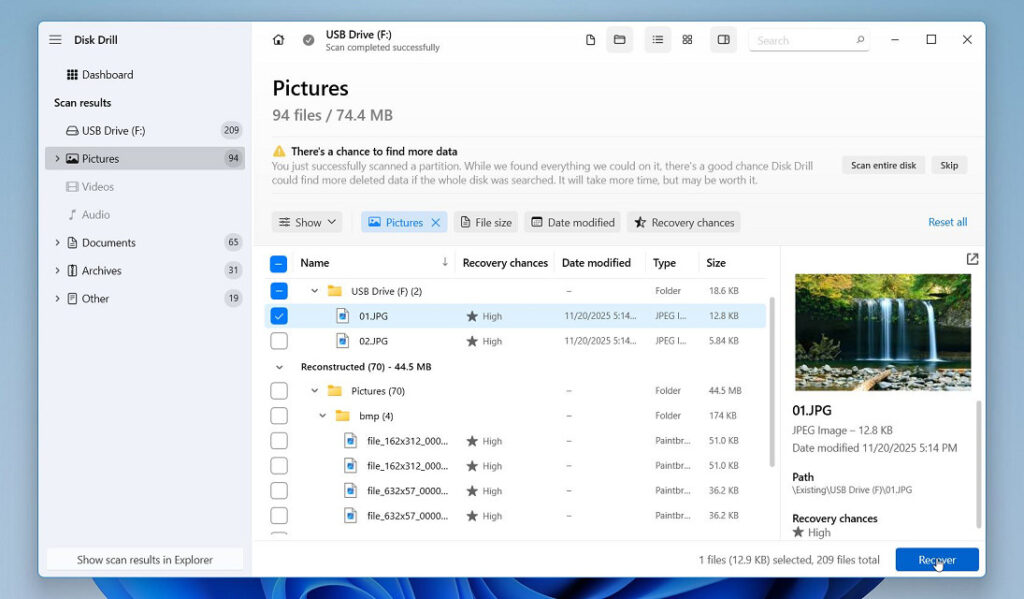
- The program analyzes the entire storage surface sector by sector to detect recoverable data. It looks beyond the file system and reads the raw content of the drive (if the recovery tool isn’t limited to signature-based scanning).
- If the file system is too damaged or missing entirely, the tool falls back on signature scanning. Every file type has a unique identifier at its beginning. The software detects these signatures and uses them to locate files that have lost their original paths or names.
- When pieces of a file are scattered across the drive, the software rebuilds them in the correct order so the file becomes readable again.
- Once the scan completes, the program displays a list of recoverable items, often grouped by type.
- Users usually can preview files to verify quality before saving them to a separate storage device.
For mobile devices, a similar approach applies, and users can turn to phone data recovery software when they need to restore missing files from a smartphone. However, it is usually more limited than computer data recovery tools, so most people only use it when they don’t have access to the PC.
And you should also remember that although recovery software is powerful, it has limitations. If data has been overwritten, or if the physical media is failing, the data recovery program may not help.
Professional Services

Professional data recovery services step in when software cannot help, especially in cases involving hardware damage. The process usually includes several key steps:
- Specialists test the drive when it fails to spin, makes unusual noises, or is not detected. They identify which internal component has failed.
- The drive is opened in an ISO-controlled cleanroom that protects the platters from dust and moisture. Technicians inspect the read/write heads, actuator arm, platters, and PCB.
- Damaged components are replaced with compatible donor parts. Firmware repairs may also be required.
- Once the drive becomes stable, engineers create a sector-by-sector clone and begin reconstructing the file system to extract intact data.
While professional recovery can be costly, it becomes the only viable solution when the data holds great value and the hardware itself cannot operate. The combination of expertise, cleanroom work, donor parts, and firmware-level repairs provides the best chance of retrieving data that would otherwise be lost permanently.
However, one important limitation remains: if the data has already been overwritten, no service can restore it. The situation mirrors DIY tools in this regard – once new information replaces the old content, the original files no longer exist.
What to Expect in Terms of Cost
And now we want to talk about the question of cost. Data recovery costs vary widely because every case is unique. The price depends on the type of failure, the storage device, the complexity of the damage, and the amount of work required to retrieve the files.
- Software-based recovery is the most affordable option. Many data recovery programs offer free scans and limited free restores, with full versions usually costing between $40 and $120. This option works well for logical issues such as accidental deletion, formatting, or minor file system corruption. The cost covers the software license only, with no additional fees.
- A professional lab is way more expensive, especially for business data recovery, because it requires more time, specialized tools, controlled environments, and trained engineers. Cleanroom work, donor parts, and firmware-level diagnostics add substantial cost. A single donor head assembly often costs $80–$300, and some jobs require multiple donor parts to stabilize the drive. Cleanroom maintenance adds even more expenses, with ISO-certified environments costing thousands of dollars per year to operate.
Most reputable labs provide a free evaluation before quoting a final price. They examine the device, identify the failure, and estimate the time and cost required. Many also follow a no data, no fee policy, which means you only pay if the recovery succeeds. In general, software remains the best first step for simple, everyday data loss scenarios. Professional services become necessary when the device shows signs of hardware failure or the data carries great personal or business value.
Wrapping Up
Data recovery gives users a path to restore valuable files after deletion, quick formatting, corruption, or hardware failure. However, you should remember that prevention remains the strongest protection against permanent loss. Regularly back up important files, follow the 3-2-1 backup rule, replace aging drives before they fail, enable automatic cloud sync, use surge protection, and keep devices away from extreme heat or moisture. In our experience these basic habits reduce the risk of data loss and minimize the need for recovery later.


Magnitude 3.7 earthquake rattles Kansas, strongest in state this year

Jimmy Kimmel extends contract with ABC through 2027

Death toll rises to 13 in riot at Ecuador’s Machala prison

UK identifies new recombinant mpox strain in traveler returning from Asia
-

 Health6 days ago
France confirms 2 MERS coronavirus cases in returning travelers
-

 Health1 week ago
8 kittens die of H5N1 bird flu in the Netherlands
-

 Entertainment6 days ago
Joey Valence & Brae criticize DHS over unauthorized use of their music
-

 US News3 days ago
Magnitude 7.0 earthquake strikes near Alaska–Canada border
-

 Legal1 week ago
15 people shot, 4 killed, at birthday party in Stockton, California
-

 US News1 week ago
Fire breaks out at Raleigh Convention Center in North Carolina
-

 Legal5 days ago
Woman detained after firing gun outside Los Angeles County Museum of Art
-
 Health7 days ago
Ethiopia reports new case in Marburg virus outbreak