
Reviews
How to Use Free AI Art Generator for Stunning Visuals (No Tech Skills Needed)

AI art generators allow you to create high-quality, realistic images without any technical skills. Whether you want to transform a selfie into a work of art, generate unique social media content, or simply explore your creativity, these AI tools can produce stunning visuals quickly and easily.
However, there are many types of AI tools on the market, and some have limited free features. How do you pick the right platform to generate the results you want, like a professional portrait or a fun artistic effect? Learn more details from the post now!
Why AI Art Generators Suit “No-tech” Users
In the past, creating a digital artwork or a stylized portrait required mastering complex software like Photoshop. Today’s AI art generators have completely removed these barriers with intuitive interfaces and automated adjustments.
| Reasons | Description |
| User-Friendly Interface | Tools, like a1.art, offer simple dashboards so you can generate images by just clicking “Run” on a template, without understanding complicated software. |
| Automatic Enhancements | AI algorithms automatically optimize lighting, colors, and styles using millions of built-in filters to produce realistic and artistic results. |
| Time-Saving | What would take hours to design manually can now be done in seconds. |
| Creative Freedom | Even without technical skills, users can experiment with countless styles, from “Traditional Sari” and “3D Cute” to “LinkedIn ID Photos” and “Couple Portraits.” |
In a nutshell, AI art generators offer a stress-free way to create professional-quality visuals while allowing beginners or “no-tech” users to learn through experimentation.
How to Choose the Right AI Art Generator
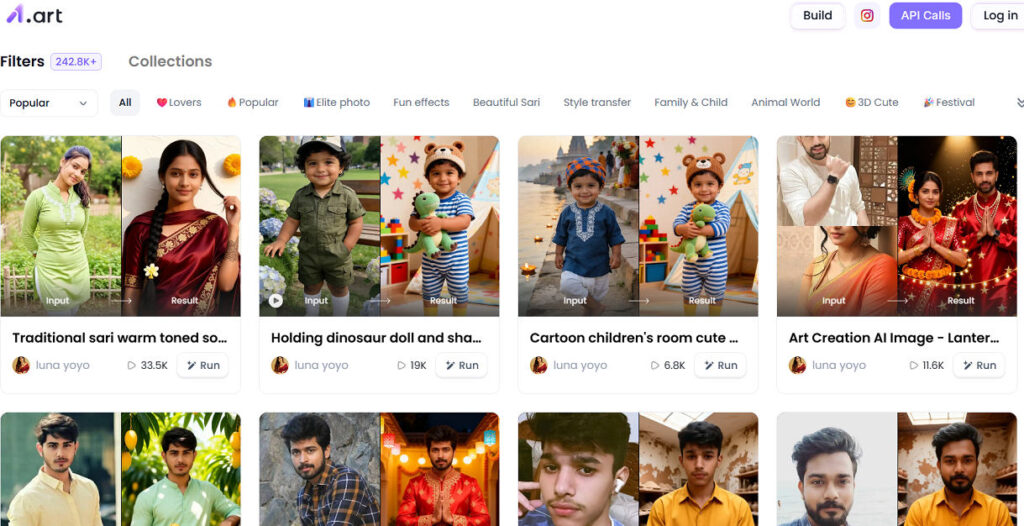
Selecting the right AI art generator can be overwhelming due to the growing number of platforms. To pick the most suitable option for your creative projects, you should consider the following factors:
- Ease of Use: Look for tools with clear instructions and pre-set templates. For example, a1.art features a massive collection of 242.8K+ filters and popular categories like “❤️Lovers,” “👔Elite photo,” and “Fun effects,” designed specifically for beginners.
- Variety of Styles: Ensure the tool allows you to explore different aesthetics, from realistic portraits and traditional themes (like “Beautiful Sari”) to fantasy and animated styles (like “😊3D Cute”).
- Output Quality: Verify that the tool can produce high-resolution images suitable for social media, blogs, or professional profiles.
- Community and Inspiration: Platforms that showcase a gallery of recent creations, like the ones by “luna yoyo” and “Maochulai3.0” on a1.art, can provide inspiration and show you what’s possible.
If you’ve been searching for a versatile AI image generator, a1.art stands out as a top choice. It features a vast library of templates and effects for fashion, portraits, festivals, and lifestyle, allowing users to generate and edit realistic, high-quality photos effortlessly for free. This gives users endless creative possibilities for social media, blogs, and personal projects.
How to Create Stunning Images Using the AI Tool
As mentioned above, a1.art provides free access to its powerful AI photo body tools, including bikini AI and abs editor. It enables you to generate stunning, high-quality body photos without any technical skills.
Here’s a simple guide on how to use it:
Step 1. Visit the a1.art website and sign in to your account. For the first time login, you need to create an account using your email address.
Step 2. Browse the extensive library of filters and collections (e.g., “Popular,” “Family & Child,” “Animal World”). Select an effect that matches your creative vision, such as “Traditional sari warm-toned soft light photography” or “LinkedIn ID Photo – Tech Industry Male.”
Step 3. Upload your photo into the interface and click “Run” . Wait a few seconds for the AI conversion to complete. You can then view and download your new image from the “Recent Generation” section.
Bottom Line
After exploring how to choose and use an AI art generator, you now have a clear path to creating stunning images effortlessly. For “no-tech” users or beginners, platforms like a1.art turn creative image generation from a complex task into an easy and fun process. Now, you can start generating and refining your first AI-enhanced photos with confidence!
I hope this revised version meets your needs. It focuses on a1.art’s strengths as a versatile AI art generator, which should align well with the guidelines of a conservative website.



-

 Legal1 week ago
Man shot and killed by police after pointing gun at people in Austin, Texas
-

 World1 week ago
Death toll from wildfire in southern Spain rises to 13
-

 Politics1 week ago
U.S. sanctions 10 Cuban entities over repression and regime funding
-
 Legal7 days ago
Muslim mall worker critically injured in stabbing over his religion
-

 Legal6 days ago
New Mexico detective convicted of helping drug trafficker evade DEA operations
-

 Legal13 hours ago
Sinaloa Cartel leader ‘El Mayo’ sentenced to life in U.S. prison
-

 Legal1 week ago
New York man arrested after livestreaming threats to kill Donald Trump Jr.
-
 Legal1 week ago
Austin police release footage of fatal shooting of man who pointed gun at bystanders