
Reviews
How to Fix Corrupted Video Files on iPhone?

The iPhone 17 comes with 48MP both main camera and ultra wide camera, along with 18MP front-facing camera that captures high-quality video upto 4K resolution. The iPhone captured videos are consistently ranking among the best smartphones for video recordings. However, they are vulnerable to corruption like any other video files.
In this blog, we’ll break down why this might happen and walk through fixes, step by step and to get your iPhone videos to play normally again.
Possible Causes for Corrupted iPhone Videos
Your iPhone videos can get corrupted by several underlying issues in your device or the software used for playing it. For example:
- Corrupted video files: If an iOS update failed or interrupted, it may damage your iPhone video files.
- Outdated or incompatible media player: If the app used for playing the video is outdated or is incompatible with the iPhone, it may look like your video is corrupted.
- Interruption during video recording or transferring: Disturbance during video recording or transfer due to unexpected shutdown, or camera application crashing etc. can corrupt the video.
- Improper Video conversion: iPhone videos can corrupted during the video file format conversion.
- Editing mistakes: Amateur video editing can sometimes damage the video file header resulting in corrupted iPhone video.
By knowing these causes, we can target the right fixes.
Methods to Fix Corrupted iPhone Videos
Below are step-by-step solutions to troubleshoot corrupted iPhone video files.
Method 1: Use Specialized Online Repair Tool
You will need a specialized video repair tool like Stellar Online Video Repair to address the corruption issues with iPhone videos, where they fail to open entirely or exhibit audio problems. This is the best online video repair tool to fix corrupted or damaged video online for free.
This tool is better than other online video repair tools because of its strong commitment to data privacy which automatically remove both uploaded and repaired video files from the server within 3 hours of uploading the original videos. Moreover, you don’t need to install this tool, you can use it directly from the web-browser of your iPhone to get watermark-free repaired videos.
How to Use Stellar Online Video Repair to Fix Corrupted iPhone Videos?
- Go to https://repair.stellarinfo.com/ and click Sign in to log in to your account.
- Once successfully logged in, click on Upload Video to upload corrupted iPhone video files.
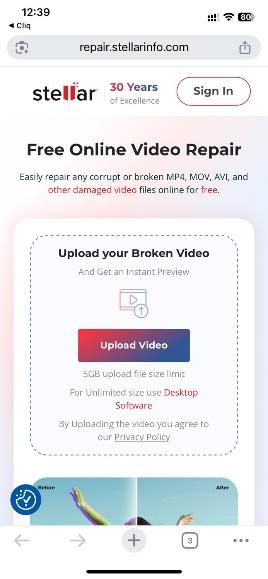
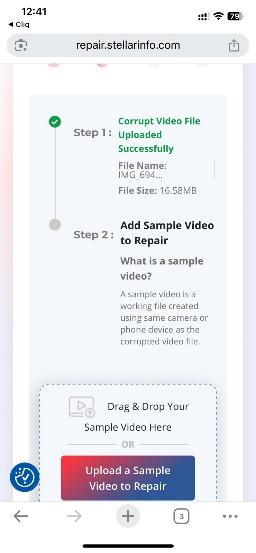
- Next, click Upload Sample Video to Repair to add the sample video files.
- Click Start Repair.
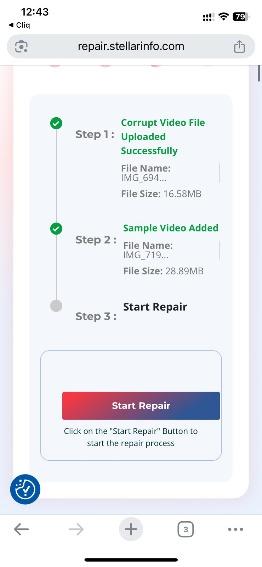
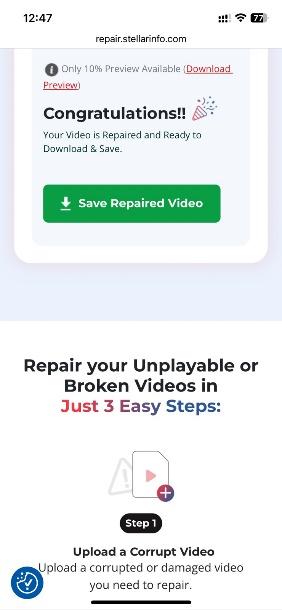
- It will take some time to repair the corrupted iPhone videos. After the process is over, click Save Repaired Video to download the repaired video file.
Method 2: Convert your iPhone Video to Another format
Often, converting the video format solves minor corruption issues such as out-of-sync audio or blurry iPhone video playback. In this process, the original iPhone video is decoded into a raw format and re-encoded into a new one. You can use various online video converter tool to convert your corrupted iPhone videos such as CloudConvert, VEED.io, Movavi Video Converter, etc. Here are the steps that are generally adaptable to any online video converter you choose:
- Open a reliable online video converter like Cloudconvert that supports various file formats and codecs.
- Upload your corrupted iPhone video file.
- Select a new format for your video and adjust the audio and video codec settings. If available, opt for AAC for audio and H.256 for video.
- Click convert to initiate the video conversion.
- Once the conversion is complete download the converted video file to your device and check if it is playing.
Additional Ways to Fix Corrupted Videos on iPhone
In this section, we introduce additional ways to resolve issues if your video is not playing on iPhone not because it is corrupted but because of app or iOS issues.
- Restart your iPhone
Sometimes, it’s a simple glitch in iOS or the Photos app that hinders the playback; in such case just close all the apps from the App Switcher and restart your iPhone.
Once the iPhone is on, open the Files or Photos app and try playing the video.
- Re-Download or Restore from Backup
If the video got corrupted because it was interrupted during download, AirDropping, or syncing, then try re-downloading or requesting the file again.
Moreover, use iCloud.com or iTunes backup to re-download the video file again.
- Check for iOS or App Issues
If one or more of your captured iPhone videos are misbehaving, then it can be app or iOS issue. In such scenario
- An incomplete or buggy iOS update can trigger this corrupted video, so ensure iOS itself is up-to-date:
- Offload and reinstall the Photos and Files app to clears out broken caches that might trigger corruption issue.
Tips to prevent Video Corruption in iPhone
Following the below-mentioned precautions can help you avoid the frustrating experience of dealing with corrupted video files on iPhone
- Always keep your video files backed up on multiple storage mediums.
- Make sure iPhone is fully charged while capturing or transferring videos.
- Ensure your iPhone, and media player app is up-to-date to prevent potential corruption.
- Use reliable antivirus software to keep your iPhone free from malicious programs that could corrupt your videos.
Conclusion
When you witness a corrupted video files on your iPhone, you can suddenly start to feel irritated. But don’t you worry, it usually has a fix. By doing some of that tech magic, like using online video repair tool and converting the video format, and restarting your iPhone, you can get the videos laying again. Smooth, right? But don’t forget to keep iPhone and various media player app up-to-date normally to prevent future corruption.



-

 World1 week ago
5 injured in suspected anti-Muslim attacks in Scotland’s capital
-

 World22 hours ago
Germany breaks national all-time heat record amid European heatwave
-

 Business1 week ago
Ubisoft co-founder Claude Guillemot killed in France plane crash
-

 Legal4 days ago
Texas Amber Alert: 14-year-old Audrey Rich abducted in Big Springs
-

 Legal6 days ago
6 killed in New York motel fire; man arrested on arson charges
-

 Legal6 days ago
2 more arrested in alleged plot to attack UFC event at White House
-

 World3 days ago
Netherlands issues 1st-ever code red warning for extreme heat
-

 World3 days ago
Doctor subdues attacker after 4 stabbed at Polish hospital