
Reviews
How to Remove Video Watermarks Without Quality Loss? 3 Simple Methods

Video watermarks are designed to protect copyright, brand identity, and original ownership. Sometimes, you may need to remove a video watermark for sharing. In this guide, we’ll walk you through three simple methods that work for different types of watermarks and users.
What Are Common Types of Video Watermarks
Before choosing a removal method, it’s important to understand the type of watermark you’re dealing with. This is because different watermarks may require different methods.
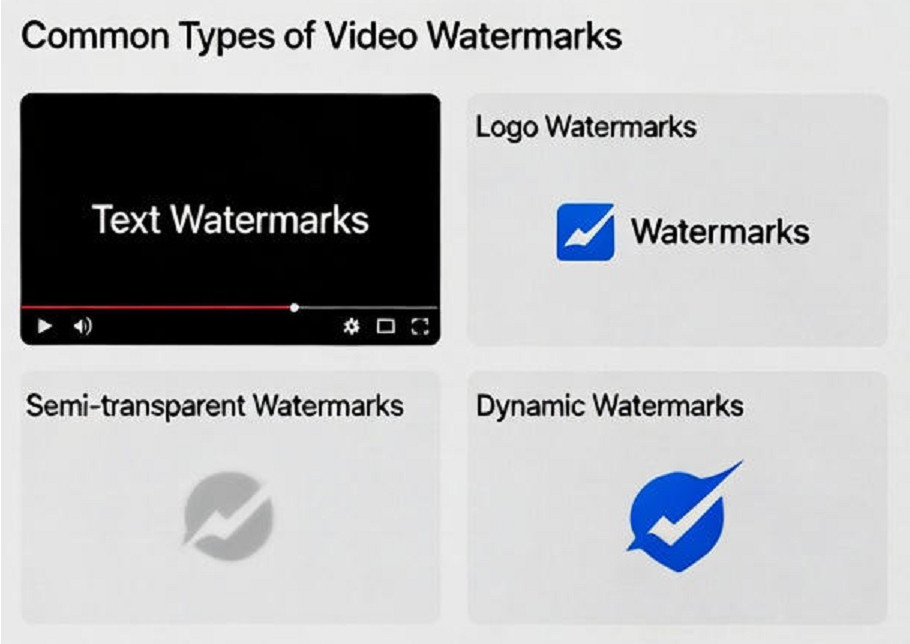
Text Watermarks: These are the most common types, usually consisting of a simple brand name, a URL, or a date stamp (e.g., “Shot on iPhone”). They are typically solid colors and located in the corners.
Logo Watermarks: Often more complex than text, these involve graphic symbols or brand icons. They are frequently used by broadcasting networks or software companies to mark their output.
Semi-transparent Watermarks: These are subtle, “ghost-like” overlays that allow the video content to be seen underneath. While less distracting, they are technically harder to remove because the removal tool must distinguish between the watermark and the background details.
Dynamic Watermarks: Also known as moving watermarks, these bounce around the screen or change positions periodically (common in trial versions of editing software). These require tools that can track motion over time.
How to Remove Video Watermarks Without Quality Loss
Whether you prefer an automated AI solution or a manual editing trick, these 3 methods are curated to ensure your final export looks as if the watermark never existed in the first place. Let’s start exploring.
Method 1. Use a Free Video Watermark Remover Online
This is the simplest and fastest method, suitable for almost everyone—including beginners with no video editing experience. A free online video watermark remover allows you to upload your video, select the watermark area, and let AI handle the removal process automatically. It works for all types of watermarks.
Here you can use a free online video watermark remover, like EaseMate AI. It’s designed to remove video watermarks without any skills. It supports common formats like MP4, MOV, and AVI, and preserves the original resolution and frame rate.
Method 2: Crop the Watermark Area
Cropping is a traditional and straightforward method that works well when the watermark is placed along the edges of the video, such as the top, bottom, or corners. It’s especially suitable for users who already use basic video editing tools.
This method is ideal for:
- Logo watermarks in corners
- Text watermarks at the top or bottom
- Videos where a light frame size reduction is acceptable
The process involves trimming the video frame to exclude the watermark area. Most video editors, including free tools, offer a crop function. Since cropping doesn’t alter the remaining pixels, it generally avoids compression-related quality loss.
However, cropping will change the aspect ratio or resolution, which may not be suitable for all platforms. This method is best for casual users, educators, or presenters who prioritize simplicity over maintaining the original frame dimensions.
Method 3. Overlay with Custom Logo
Overlaying is a creative workaround rather than a true removal method, but it can be very effective in certain scenarios. This approach involves placing your own logo, image, or graphic over the existing watermark. It works best for:
- Brand videos
- Business presentations
- Social media content
- Situations where rebranding is acceptable
Instead of removing the watermark, you visually replace it with something intentional. This helps maintain video quality because no background reconstruction is needed. Many video editors allow you to add overlays with adjustable opacity and position.
To Sum Up
How to remove a video watermark without losing quality? By now, you should have a clear answer. In this guide, we explored 3 effective methods, each designed for different watermark types and user needs. Whether you prefer a quick online tool, a basic editing technique, or a creative workaround, choosing the right method will help you achieve clean results.


5 women among 6 injured in targeted acid attack in Jersey City, New Jersey

What to Do If a Car Accident Disables You

U.S. strike kills 1 on alleged drug vessel in Eastern Pacific; 2 survive

Suspect and hostage dead after stolen vehicle pursuit in Oklahoma
-

 World1 week ago
Man seriously injured in attempted beheading in Northern Ireland
-

 World3 days ago
Tren de Aragua leader killed in U.S. strike in Venezuela
-

 World3 days ago
Woman dies after being thrown from bridge without bungee cord in Brazil
-

 Legal6 days ago
Arizona man convicted of threatening to kill Trump and Harris
-

 Legal6 days ago
Montana man charged with threatening Hawaii governor and his family
-

 Legal6 days ago
Man kills 4 family members at home in Livonia, Michigan
-
 US News1 week ago
Man attacked by shark at Florida Navy base
-

 Legal7 days ago
North Carolina teen sentenced for school shooting threats over Charlie Kirk posts